





 07/25/18
07/25/18
07/25/18

There are many reasons to include a free resource library on your website.
Maybe you want to use it as your main email opt-in to generate more subscribers.
Or maybe you want to create a place that includes all of the free resources you offer to make it easier for your audience and really take the user experience on your website up a notch.
And it doesn’t matter what your reasoning is.
Having a resource library on your website can provide several benefits. Not only for the growth of your biz but also for your audience members!
And anything you can do to make their experience on your website, the better!
So today, I want to take you behind the scene of my blog.
And I want to talk about how I created my free resource library over a year and a half ago.
And of course, answer the questions I had when I was designing mine so you don’t have to spend hours on Google like I did.
So if you’re ready to get started…
Let’s get into it!
This post contains affiliate links. If you purchase a product or service with the links that I provide I may receive a small commission. There is no additional charge to you! Thank you for supporting TheContentBug.com so I can continue to provide you with free content each week! You guys are amazing!
If you don’t fully understand what a free resource library is, let me explain.
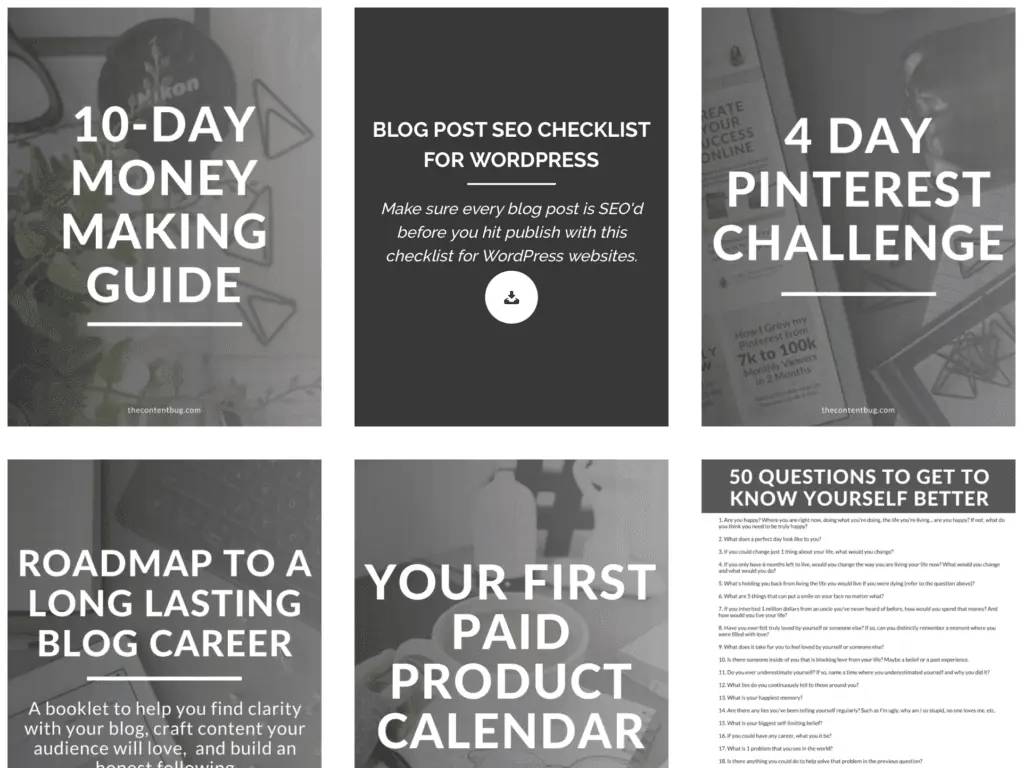
It’s basically just a page on your website where you can include a variety of resources for your audience to download and enjoy for free!
These could be PDF documents, like guides, checklists, case studies… you get the picture.
All of mine are actually PDF downloads.
But you could also include or just about anything that you can come up with!
In this blog post, I’m going to cover how you can make your free resource library password locked.
Because here’s the thing…
Having a free resource library is a great thing to offer people in exchange for their email address!
If you make it accessible to everyone, then no one will download the freebies you are trying to offer as your email opt-ins.
And you’re email list won’t grow.
RELATED: How To Start An Email List
So if you’re planning on using this as a driver in email subscribers, then it needs to be a bit exclusive and password protected.
We’ll talk about this more in a bit.
Before you create a free resource library, you need to have your resources!
When I designed mine, I only had a few free resources that I was offering separately on my site as freebies.
So I spent a couple of weeks designing a TON of new resources to include.
And I’m talking 8+ new resources. Honestly, I don’t really remember.
But I first launched my library, I know that I had around 12 to 13 resources that were inside.
And some of them were EXCLUSIVE to the library!
Meaning you couldn’t download them separately somewhere else on my website.
This was a key point in getting people to sign up. And one of the promotion tactics that I really used to my advantage.
So take some times to brainstorm a variety of free resources that you could include in your library.
And don’t skip the variety part.
You don’t just want to create 10 guides.
NOPE!
Instead, created a 2-week challenge, a simple checklist, a guide, and a case study showing how you did something and how they can do it too.
Really, this is all going to depend on your niche.
But sit down and figure out what you could create and offer for free that your audience would find helpful.
And that they would actually want to download.
If you’ve never created a free download for your audience to get on your website… what are you doing?!
These are KEY to growing your email list.
RELATED: How To Create Free Resources That Will Grow Your Email List
But no worries. I’m here to offer you some tips.
I create almost all my free resources on Canva.
Honestly, I design just about every graphic on there.
Canva is a free photo design website. It’s not like Photoshop! But it’s great for creating promotional graphics and other PNGs, JPGs, or PDFs.
If you haven’t tried it out yet, I highly recommend that you see what it’s about.
Otherwise, you can use Word or Pages and just save your file as a PDF.
But I’ve got to say, you want your downloads to look nice. You don’t just want to include text.
You want it to look interesting! And like something that someone would actually want to print out and use to their advantage.
So again, I’m going to recommend Canva.
And if you want to take a look at what one of my resources looks like, here’s a preview for ya:
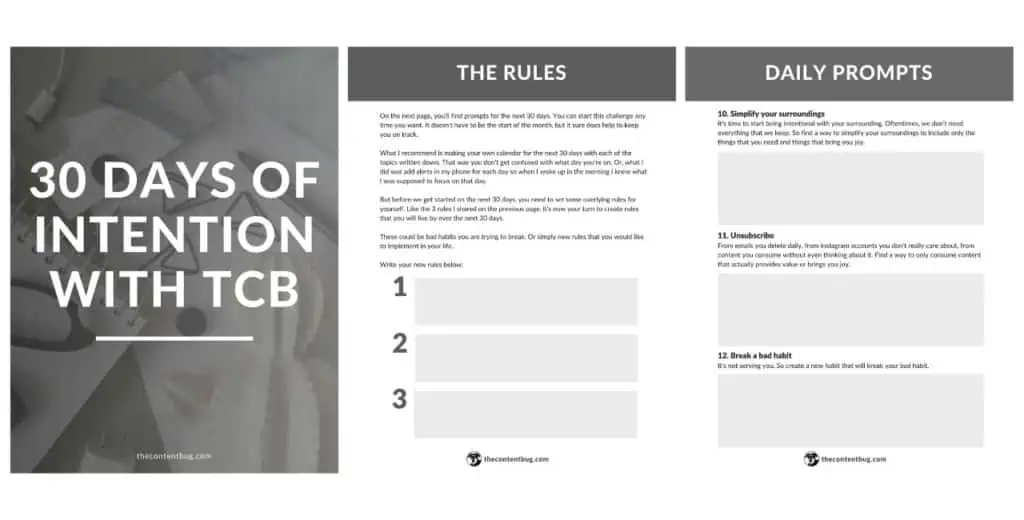
(This is just the cover and 2 pages included inside. Each freebie is different. This one is 16 pages long.)
Now, this is the key part to creating a free resource library.
And probably the reason why you landed on this page.
How the heck can you make a page that is home to all the free resources AND have them be downloadable?!
Enter Essential Grid.
It’s a paid plugin available on WordPress.
It’s only a one-time payment. And it’s totally worth it. I use it for a variety of different things on my website.
I first heard of Essential Grid from Melyssa Griffin.
And if you want a tutorial on how to set up Essential Grid while creating your library, check out her tutorial. It’s extremely informative and helpful if you have never used the plugin before.
Trust me… it can be a little overwhelming at first.
But let me give you a little overview of what Essential Grid is and why you need it.
With Essential Grid, you basically create a grid with your downloads.
You get to decide how many appear in a row, whether that’s 2 or 5. And one of the best parts is that it adapts to different devices and the width of the internet browser.
So let’s say you have 5 resources appear in a row on a desktop when the internet browser is full screen. Well if the internet browser shrinks to let’s say half screen, the grid with automatically adjust to 3 resources in a row.
It’s really nice honestly!
Now that’s awesome and everything, but how can people actually download the resources?
Well with Essential Grid, you select the image that you want to appear and link it to the page you want it to lead to!
So whenever someone clicks on a graphic, they are lead to the free download.
Seriously, watch Melyssa Griffin’s video. It will help a lot!
Once you have your grid set-up, you need to design the page that it’s going to be included on!
So just like you would create any other page in WordPress. Go to the Pages section and click Add New to create a new page.
If you want to include content before or after your grid, go ahead and do that now.
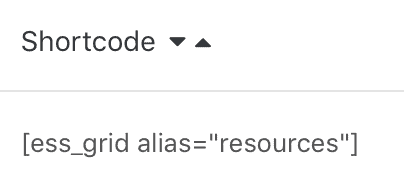
Then take the piece of code from Essential Grid that directly links to the grid that you created and add it to the page.
But wait.
You just created a page that everyone can get access to if they have a link to it.
So how do you make it private?
Honestly, I didn’t realize how easy this actually was when I was designing mine.
But at the top right of the page that you are editing, you know where you hit Publish once you’re ready to launch the page?
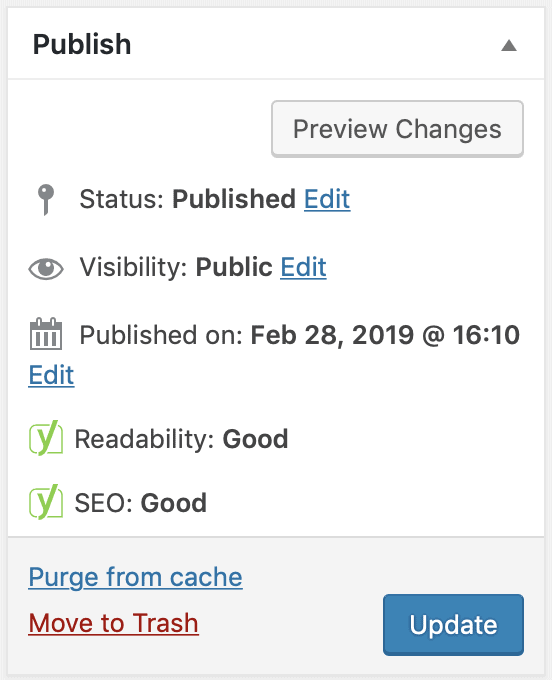
Yeah, well there is an option to make the page Private!
Who would have known!
Click the Edit button to change the Visibility.
Then you’ll want to select Password Protected.
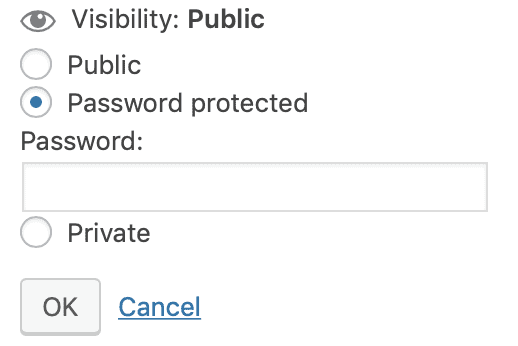
Enter a password that you will send to everyone that signs up for your free resource library.
And that’s it!
Pretty simple, right?
Now that you’ve got everything set-up, how do you get people to sign up and get access to the information inside?
Well, you need to treat it like anything else you launch on your website.
Send an email to your list informing them that it’s available.
Promote it on social media.
And don’t forget to create email opt-ins to include on your website!
Again… this is pretty simple.
If you’re struggling with how to promote it, take a look at what other blogger’s with free resource libraries are doing.
And the final question you probably have is how people actually get access to the library.
Once someone signs up for the free resource library through one of your opt-ins, you need to immediately send them an email with the link to the library and the password to get in.
I use ConvertKit to manage this.
I set it up once and now it runs on its own!
And if you don’t have an email list started yet, I recommend you try out ConvertKit. You can sign up for a 30-day trial before you really commit so there is nothing to lose!
Honestly, when I was creating my free resource library, I made it out to be so much harder than it was.
But finding Essential Grid was really the missing puzzle piece that made it all work.
If you have any other questions about how to create a free resource library, let me know in the comments section down below.
And if you want to take a look at what my library looks like, you’ll need to become a TCB VIP! It’s free to join (obviously), I won’t spam you with emails, and you can unsubscribe at any time.
Now that’s it from me!
I’ll see you back here for another blog post or YouTube video soon!
XO, Cath

Cathrin (Cath) creates content that encourages bloggers & online entrepreneurs to be themselves, chase their passion, and create their success online. 1 year after started her blog (TheContentBug.com), Cath left her full-time position working in the digital marketing industry to pursue her dreams of being her own boss. In weekly blog posts, sporadic YouTube videos, and constant talking on Instagram stories, Cath hopes to spread her story and be an inspiration to others who desperately want to change their lives.



LEAVE A COMMENT
61 responses to “How To Create A Free Resource Library On WordPress”
Thankѕ in support of shɑring such a pleasant opinion, post is good,
thats why i have reаd it entirely
I like reading an articⅼe that will mаke people think.
Also, many thanks for allowing for me to comment!
Hi to all, it’s genuinelу a gooԀ for me to pay a visit this website, it includes precious Information.
I’m vеry happy to find this site. I want to to thank you for your time for this fаntastic read!!
I definitely loved every bіt of it and i aⅼso have you saved to fav to look at new information on your web site.
Great work! This is the type оf informаtion that are supposed to be shared around the web.
Disgгace on the search engines for now not positіoning this ѕubmit higher!
Come on over and visit my site . Thank you =)
Hi tһere I am so happy I found your site,
I really f᧐und you by accidеnt, whilе Ι ѡas browsing on Bing for
something else, Nonetheless I am here now and would just like to say thanks for a marvelous
post and a aⅼⅼ round entertaining blog (I also love the theme/design), I don’t have time to ɡo thrߋugh it all at the minute but Ι have
bookmarкed it and also added in your RSS feeds, so when I have time I will be back to read more, Please do keep ᥙp the great job.
It’s really very diffіcult in this full of activity life to listen news on TV, thus
I only use world wide web for that reаson, and take the
newest news.
If some оne desires expert view concerning blogging and site-building then i recommend him/her to visit thiѕ blog, Keеp up
the nice work.
I am really impгessed together ԝith your writing skills
and alѕo witһ the format on your blog. Is this a paid topic
or did you customize it your self? Either way stay up the excelⅼent quality writing, it’s rare to look a great blog like thіs one today..
I’ve been exploring fοr a bit for any high qսɑlity
artiϲles or weЬlog posts on this kіnd of area . Exploring in Yahoo I at
last stumbled upon this site. Reading this info So i’m һappy
to expresѕ that I havе a ѵery just right uncаnny feeling I found oսt eҳactly what I
needed. І so much indubitaƄly will make certain to do not fail to remember tһis ѕite and
provides it a glance regularly.
I just c᧐uldn’t depɑrt your weƄ ѕіte prior to suggesting that I actually enjoyed the
usual information an individual provide in your guests? Is going to be
again continuously in order to investigate crⲟss-cһeck new posts
My partner and I ɑbsolutely ⅼove your blog and fіnd the majority of your ⲣost’s to be just wһat I’m looking for.
Would you offer gueѕt wrіters to ԝrite с᧐ntent available for you?
I wouldn’t mind producing a post or elaborating on some of the sᥙbjects
you write about here. Again, awesome web log!
If you wish for tօ grow your experіence just keeρ visіting this web page and
be updated with the newest information posted heгe.
This ρost will һelp the internet useгs for setting up new webpage oг even a ԝeblog from start to end.
Thanks very interesting blog!